LinkedIn Profile Tips for Job Seekers (UK): How to Be Found, and Chosen, by Recruiters
In short
- Recruiters find you through filters: job titles, skills and locations, plus a keyword search that reads your whole profile. Use the exact words from the adverts you want.
- Your headline is shown in search results and can say something different from your job title. Lead with the role you want, not the one you have.
- Turn on Open to Work, "Recruiters only" if you are employed, and fill in the job preferences. It puts you in a filter recruiters use.
- Add the skills an advert lists, pin the ones that matter, and get them endorsed. LinkedIn says endorsed skills make you more likely to be found.
- Finish with proof: a Featured link, two recommendations and a verification badge do what adjectives cannot.
LinkedIn has more than 1.4 billion members, and about 9,000 job applications are submitted on it every minute. Those numbers are why recruiters pay for LinkedIn Recruiter, and why your profile has two jobs: appear when a recruiter searches, and convince them in the ten seconds they give the result.
This guide works through the profile in the order a recruiter reads it, using LinkedIn's own help pages for what the features do. It pairs with the LinkedIn job search guide, which covers searching, alerts and applying.
How recruiters actually find you
LinkedIn Recruiter lets a recruiter "filter by candidate requirements like job titles, skills, locations, and more using 40+ advanced filters". Its help page names the main ones: "Job titles, Location, Companies, Skills and Assessments, Schools, Industries, and Spoken languages", each of which can be narrowed to people who are "Open to work". The keyword filter takes Boolean strings and, in LinkedIn's words, can "retrieve data from an entire profile page".
Three consequences. The words matter more than the design: a search for "management accountant" will not find "finance wizard". A filter on skills only returns profiles that list the skill. And LinkedIn's help says that "a complete LinkedIn profile will increase your discoverability and profile search appearances", and that "if someone endorses your skills, it will increase the likelihood of you being discovered for opportunities". Fill every section the recruiter can filter on.
The headline: the one line in search results
LinkedIn describes the headline as "the text below your name" which "is displayed in search results and can be separate from the title of your current position", and says you can use it "to call out other professional statuses, for example if you're unemployed". That makes it the most valuable line you own. Write it as: the role you want, two or three specialisms a recruiter would search, and a sector or location signal.
| Before | After |
|---|---|
| Team Leader at a national retailer | Retail Store Manager | Team leadership, P&L, stock control | Greater Manchester |
| Seeking new opportunities | Management Accountant (CIMA finalist) | Month-end, budgeting, Power BI | Open to hybrid roles, Leeds |
| Registered Nurse | Registered Nurse (Adult) | Emergency care, triage, mentoring students | NMC registered, London |
Two rules. Put the job title first, because the first few words are what survive when the headline is cut short in search results. And leave "open to work" out of it: the setting already tells recruiters, and a headline that only says you are looking says nothing about what you do.
Photo and banner
LinkedIn's help says "members with a profile photo on LinkedIn receive up to 2X more profile views", and its photo rules say the picture "must reflect your likeness". An illustration of you is allowed; photos that consist solely of logos, landscapes, animals, words or flags can be removed. The file must be a JPG or PNG under 8MB and at least 400 by 400 pixels. For a job search: head and shoulders, recent, plain background, looking at the camera, dressed as you would be at the interview. The banner behind it, which LinkedIn recommends at 1584 by 396 pixels, is the one place to show the sector or the city; a photo of your work or your city beats the default blue.
The About section
LinkedIn says the About section "should express your mission, motivation, and skills" and suggests "one or two paragraphs". Only the first lines show before the reader clicks "see more", so the first sentence has to carry the role and the proof. The four-sentence formula from the CV personal statement guide works here too, written in the first person and a little warmer.
A fictional About section for a management accountant
I'm a management accountant with six years in manufacturing, currently at a Midlands engineering firm with £40m turnover. I run month-end for three sites, built the Power BI reporting that replaced a 40-tab spreadsheet, and cut the close from nine days to five. I'm a CIMA finalist, finishing in May. I'm looking for a finance manager role in the West Midlands, hybrid, in a business that wants its numbers to drive decisions rather than just record them.
Skills: month-end close · budgeting and forecasting · Power BI · Sage Intacct · variance analysis · stakeholder reporting
The skills line at the end is deliberate. It puts the exact terms a recruiter searches into a section the keyword search reads, without stuffing them into sentences.
Experience: titles recruiters search, bullets with numbers
Use the job title the market uses, not the one on your contract. If your employer called you "Customer Happiness Associate", the title field says "Customer Service Advisor" and the description mentions the internal title. Under each role, three to five bullets in the shape of a CV bullet: what you did, for whom, with a number. Dates and titles must match your CV, because recruiters compare the two.
Skills: the filter you control
LinkedIn lets you add "a maximum of 100 skills", groups them into Industry Knowledge, Tools & Technologies and Interpersonal Skills, and lets you drag them into order. Its Talent Blog reported in April 2024 that "nearly half (48%) of hirers on LinkedIn now explicitly use skills data to fill their roles", that members who list at least one skill "receive up to 2x more profile views and connection requests and up to 4x more messages", and that endorsements "elevate your profile in LinkedIn Recruiter searches". You do not need 100. You need the ones in the adverts you want, in the order a recruiter would look for them, endorsed by people who have seen you use them.
Start with the three adverts you most want to answer, copy every skill they name, and add the ones you have. For a sense of where demand is going, LinkedIn's Skills on the Rise 2026 list for the UK, published in February 2026, groups the fastest-growing skills into five areas.
| Area | Skills LinkedIn lists for the UK |
|---|---|
| AI and generative technologies | Prompt engineering, chatbot development, large language models, MLOps |
| Data and process automation | Data-driven decision making, data storytelling, business process automation, workflow management |
| Governance, risk and compliance | GRC, cyber risk management, ethical decision making, statutory reporting |
| Leadership and communication | Leadership, project management, cross-functional collaboration, cross-cultural communication |
| Strategy and commercial growth | Strategic planning, technology roadmapping, sales negotiation, relationship management |
Only add what you can defend at interview. A skill you cannot talk about for two minutes is a liability, not a keyword.
Open to Work and job preferences
LinkedIn's help page offers three settings. "All LinkedIn Members" adds the green #OpenToWork frame to your photo and is visible to everyone, "including recruiters and people at your current company". "Recruiters only" shows your status to people using LinkedIn Recruiter; LinkedIn says it takes "steps to prevent LinkedIn Recruiter users who work at your company from seeing your shared career interests" but "can't guarantee complete privacy". "Visible only to you" just tunes your job recommendations.
There is data behind the setting. LinkedIn's analysis of tens of millions of recruiter InMails sent between May 2021 and April 2022 found "the response rate for candidates who indicate they're 'Open to Work' is 37% higher than the rate for other candidates", which is why recruiters filter on it. If you are unemployed, use the public frame: it costs nothing and it changes how people respond to a message. If you are employed, use "Recruiters only". Either way, fill in the preferences: job titles, location types, locations, start date and employment types. They feed the Spotlight filter. One caution from the help page: if you stop responding to recruiter messages, LinkedIn emails to ask if you are still open, and removes the setting if you don't confirm.
Proof: Featured, recommendations, verification
Adjectives are free, so recruiters discount them. Three things on a profile are hard to fake.
- Featured. LinkedIn lets you feature posts, articles, "links to external websites, for example your personal blog or portfolio", and uploaded documents, presentations and videos. One link to something you made, or a one-page summary of a project with its result, is enough. LinkedIn says Featured content "will not be discoverable through search", so keywords belong in About and Skills, and Featured is for the reader who has already arrived. Removing a featured item is permanent, so curate rather than churn.
- Recommendations. LinkedIn says "there's no limit to the number of recommendations you can request", but two specific ones beat ten vague ones. Ask a former manager and a peer, and tell each one which project to mention.
- Verification. LinkedIn's badges confirm identity, workplace or education, "with no additional cost". Workplace verification uses your work email; in the UK, identity verification runs through LinkedIn's partner Persona and accepts an NFC-enabled passport or a residence permit. Fake recruiters are a real problem on the platform, so a verified profile reads as safe to reply to.
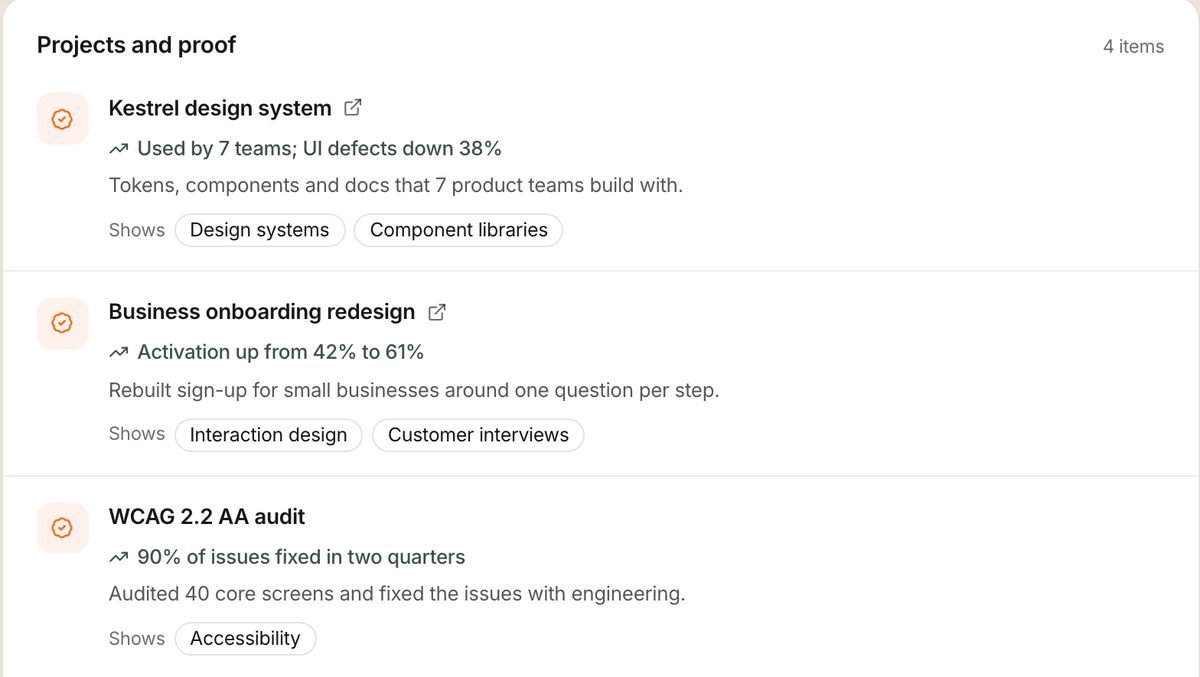
Point the Featured link at something that shows your work with results. A portfolio site, a GitHub profile or a Google Doc works. Applyd's public page is built for exactly this: your roles, skills and projects with the results and the evidence behind them, on one link that stays current.
Settings that change who sees what
- Custom URL. Yours "can be 3-100 characters long", with no spaces or symbols, and you "can change your custom public profile URL up to five times within six months". Set it to your name and put it on your CV.
- Public profile. The public profile settings page controls "what sections of your profile are eligible for display to people who are not signed in to LinkedIn", which includes Google. Leave it on while job hunting, because recruiters and hiring managers search your name. LinkedIn warns that disabling it "could also prevent you from recovering your account".
- What to leave off. Date of birth, home address and personal phone number do not belong on a public profile. Put a professional email in contact info and nothing else.
A 60-minute profile overhaul
- Pick three adverts you would apply for today and underline every job title, skill and tool they name.
- Rewrite the headline: target title, three of those terms, location.
- Rewrite About with the four-sentence formula and a skills line.
- Rename job titles to market titles and give each role three to five bullets with numbers.
- Add every underlined skill you have, reorder so the top three match the adverts, and ask two colleagues to endorse them.
- Turn on Open to Work with preferences filled in.
- Add one Featured link, request two recommendations, and set the custom URL.
Common mistakes
- A headline that is just your job title. It tells recruiters where you are, not where you want to go.
- An About section written in the third person. It reads like a press release. Recruiters are about to message you; write as you would reply.
- Fifty skills, none endorsed, in the order you added them. Reorder, trim, and get the top ones endorsed.
- Titles and dates that don't match your CV. The first thing a recruiter checks, and the first thing that loses trust.
- Open to Work on "All members" while employed, with recruiters at your own company able to see it. Use "Recruiters only" and know the privacy isn't absolute.
- Replying to a recruiter you haven't checked. Look for a verification badge, a real company page and a work email before you send a CV. The job search guide lists the warning signs.
Frequently asked questions
What should a job seeker put in their LinkedIn headline?
The role you want first, then two or three specialisms a recruiter would search for, then a sector or location signal. LinkedIn displays the headline in search results and lets it differ from your current job title, so it can describe the next job rather than the last one. Leave 'open to work' out of it; the setting already tells recruiters.
Should I use the Open to Work frame?
If you are unemployed, yes: it is visible to everyone and changes how people respond. If you are employed, choose 'Recruiters only', which shows your status only to LinkedIn Recruiter users. LinkedIn says it tries to hide that from recruiters at your own company but cannot guarantee complete privacy.
How many skills should I list on LinkedIn?
LinkedIn allows up to 100, but the useful number is the set of skills named in the adverts you want, ordered so the most important come first. LinkedIn says endorsed skills make you more likely to be discovered, so ask colleagues to endorse the top ones. Only list skills you can discuss at interview.
Do recruiters really search LinkedIn for candidates in the UK?
Yes. LinkedIn Recruiter gives them more than 40 filters, including job titles, skills and locations, a Boolean keyword search across the whole profile, and a Spotlight that lists people who have turned on Open to Work. Your profile is found by the words it contains, which is why they should match the adverts.
How do I get a verification badge on LinkedIn?
LinkedIn offers free identity, workplace and education verification. Workplace verification uses your work email address. In the UK, identity verification is handled by LinkedIn's partner Persona and accepts an NFC-enabled passport or a residence permit. The badge appears next to your name, and you can remove it at any time.
Should my LinkedIn profile match my CV?
The job titles and dates must match, because recruiters compare the two and a mismatch costs trust. The wording can differ: LinkedIn is first person and a little warmer, and it carries skills and proof a two-page CV has no room for. Use the custom URL on your CV so the two documents point at each other.
Sources
- LinkedIn Recruiter features — LinkedIn Talent Solutions
- How to use LinkedIn Recruiter to search for candidates — LinkedIn Talent Solutions
- Filter search results in Recruiter — LinkedIn Help (Recruiter)
- How to improve your InMail response rate, according to LinkedIn data (19 May 2022) — LinkedIn Talent Blog
- Why skills on your LinkedIn profile matter (4 April 2024) — LinkedIn Talent Blog
- Create a good LinkedIn profile — LinkedIn Help
- Edit your professional headline — LinkedIn Help
- Profile photo guidelines and conditions — LinkedIn Help
- Profile and background photo requirements — LinkedIn Help
- Featured section FAQs — LinkedIn Help
- Identity verification: accepted documents by country — LinkedIn Help
- Reorder skills on your profile — LinkedIn Help
- Let recruiters know you're Open to Work — LinkedIn Help
- Featured section on your profile — LinkedIn Help
- Verification badges on LinkedIn — LinkedIn Help
- Customise your public profile URL — LinkedIn Help
- Your public profile visibility — LinkedIn Help
- LinkedIn Skills on the Rise 2026: the fastest-growing skills in the UK (24 February 2026) — LinkedIn News UK
- About LinkedIn — LinkedIn Pressroom